0%

Varnish 缓存双活 构建高可用架构之路

关于 Varnish 系列其他文章的传送门

  1. 《 缓存为王 Varnish 入门 一个高效又轻量的缓存服务器 》

  2. 《 Varnish 缓存双活 构建高可用架构之路 》     您当前所在位置


logo

实验介绍

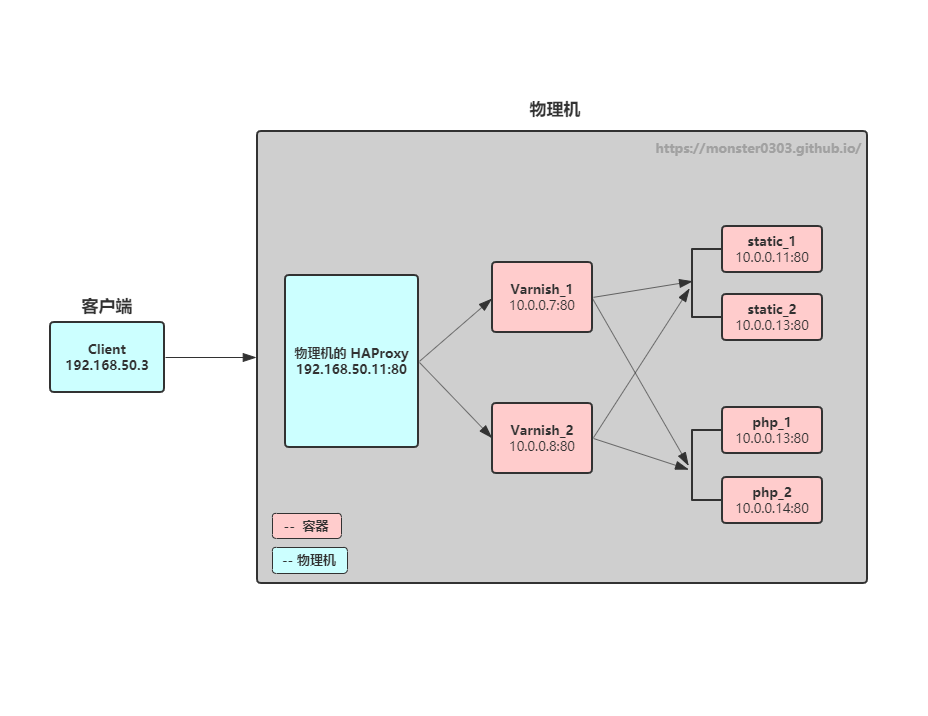
实验使用 Docker 容器来模拟生产环境的架构:

应用 功能
HAProxy(物理机) 前端调度器
Varnish_1(容器) 缓存服务器 1
Varnish_2(容器) 缓存服务器 2
static_1(容器) 静态文件 httpd 服务器 1
static_2(容器) 静态文件 httpd 服务器 2
php_1(容器) php 文件服务器 1
php_2(容器) php 文件服务器 2

实验拓扑
haproxy

实现目标

  1. 后端 httpd 服务器分为动、静两组,每组各 2 台冗余,每组允许宕机 1 台;
  2. Varnish 本身 双活,同时工作,允许宕机 1 台,使用缓存挡掉大部分请求,余下的通过负载均衡调度到后端主机,并且能监测后端主机的健康状态;
  3. HAProxy 单机,将请求 负载均衡 到 2 台 Varnish 缓存服务器,并且能监测 Varnish 的健康状态。
  4. HAProxy 把真实的 客户端 ip 传给 Varnish,Varnish 能再传给后端的 httpd 主机;

实验记录顺序从前端至后端,即 HAProxy --> Varnish --> httpd

环境准备

关闭防火墙、SELinux,打开内核转发,如果不使用容器而是多台独立的服务器,要注意 时间同步

配置 HAProxy

1. 在物理机上安装 HAProxy

1
yum install haproxy -y

2. 在配置文件中添加如下配置

vim /etc/haproxy/haproxy.cfg

1
2
3
4
5
6
7
8
9
10
11
12
13
14
15
16
17
18
19
20
21
22
23
24
25
26
27
28
29
30
31
frontend haproxy
bind *:80
default_backend varnish
// 把真实的客户端 IP 传给后端
option forwardfor

backend varnish
mode http
// 根据 uri 做 HASH
balance uri
// 因为后端是缓存服务器,这里一定要指定使用 一致性 HASH 算法
hash-type consistent
server varnish_1 10.0.0.7:80 check
server varnish_2 10.0.0.8:80 check
// 定义基于 7 层的健康状态检测
option httpchk GET /index.html
rspadd X-Via:\ HAPorxy
compression algo gzip deflate
compression type text/plain text/html text/xml text/json

// 状态页
listen stats
bind *:8080
stats enable
stats hide-version
stats uri /stats
stats realm Haproxy\ Statis_stat
stats auth root:123qwe
stats admin if TRUE
stats refresh 9s

3. 启动服务

1
2
systemctl start haproxy
systemctl enable haproxy

配置 varnish

1. 配置 default.vcl 文件

容器存储卷目录:vim /data/varnish/default.vcl

1
2
3
4
5
6
7
8
9
10
11
12
13
14
15
16
17
18
19
20
21
22
23
24
25
26
27
28
29
30
31
32
33
34
35
36
37
38
39
40
41
42
43
44
45
46
47
48
49
50
51
52
53
54
55
56
57
58
59
60
61
62
63
64
65
66
67
68
69
70
71
72
73
74
75
vcl 4.0;

// 定义 static 的健康状态监测
probe static_health {
.url = "/index.html";
.interval = 10s;
.timeout = 1s;
.window = 8;
.threshold = 6;
}
// 定义 php 的健康状态监测
probe php_health {
.url = "/index.php";
.interval = 10s;
.timeout = 1s;
.window = 8;
.threshold = 6;
}

// 加载 director 负载均衡模块
import directors;

// 定义后端
backend static_1 {
.host = "10.0.0.11";
.port = "80";
.probe = static_health; // 引用健康状态监测
}

backend static_2 {
.host = "10.0.0.12";
.port = "80";
.probe = static_health;
}

backend php_1 {
.host = "10.0.0.13";
.port = "80";
.probe = php_health;
}

backend php_2 {
.host = "10.0.0.14";
.port = "80";
.probe = php_health;
}

// 定义组
sub vcl_init {
new web_static = directors.round_robin(); // 定义一个 web_static 组,使用 rr 调度算法,不支持权重
web_static.add_backend(static_1); // 定义组内的后端主机
web_static.add_backend(static_2);

new web_php = directors.round_robin();
web_php.add_backend(php_1);
web_php.add_backend(php_2);
}

sub vcl_recv {
// 定义动静分离规则
if (req.url ~ "(?i)\.php$") {
set req.backend_hint = web_php.backend();
} else {
set req.backend_hint = web_static.backend();
}
}

sub vcl_deliver {
// 增加一个响应报文首部,显示当前页面是否为缓存
if (obj.hits>0) {
set resp.http.X-Cache = "HIT via" + " " + server.ip;
} else {
set resp.http.X-Cache = "MISS from " + server.ip;
}
}

2. 安装 docker-ce

1
2
3
4
cd /etc/yum.repos.d/
wget https://mirrors.aliyun.com/docker-ce/linux/centos/docker-ce.repo
yum install docker-ce -y
systemctl start docker

3. 因为默认网络不支持指定 IP,所以新建一个容器网络 mybr0

1
2
3
4
5
docker network create \
--subnet 10.0.0.0/24 \
--gateway 10.0.0.1 \
-d bridge \
mybr0

4. 运行 Varnish 容器

1
2
docker run --name varnish_1 -v /data/varnish/default.vcl:/etc/varnish/default.vcl:ro --tmpfs /usr/local/var/varnish:exec --network mybr0 --ip 10.0.0.7 -d varnish
docker run --name varnish_2 -v /data/varnish/default.vcl:/etc/varnish/default.vcl:ro --tmpfs /usr/local/var/varnish:exec --network mybr0 --ip 10.0.0.8 -d varnish

配置后端 Apache

后端使用内置了 httpd 的 php 容器。

1
2
3
4
5
6
#--- 第一组 静态文件服务器
docker run -d --name static_1 --network mybr0 --ip 10.0.0.11 -v /data/static_1:/var/www/html php:rc-apache
docker run -d --name static_2 --network mybr0 --ip 10.0.0.12 -v /data/static_2:/var/www/html php:rc-apache
#-- 第二组 动态文件服务器
docker run -d --name php_1 --network mybr0 --ip 10.0.0.13 -v /data/php_1:/var/www/html php:rc-apache
docker run -d --name php_2 --network mybr0 --ip 10.0.0.14 -v /data/php_2:/var/www/html php:rc-apache

创建测试页

1
2
3
4
echo "PHP_Server Number 1" > /data/php_1/index.php
echo "PHP_Server Number 2" > /data/php_2/index.php
echo "Static_Server Number 1" > /data/static_1/index.html
echo "Static_Server Number 2" > /data/static_2/index.html

在 httpd 日志格式中增加 X-Forwarded-For 字段

1
2
3
4
docker exec static_1 sed -i 's/"%h/"%{X-Forwarded-For}i %h/' /etc/apache2/apache2.conf
docker exec static_2 sed -i 's/"%h/"%{X-Forwarded-For}i %h/' /etc/apache2/apache2.conf
docker exec php_1 sed -i 's/"%h/"%{X-Forwarded-For}i %h/' /etc/apache2/apache2.conf
docker exec php_2 sed -i 's/"%h/"%{X-Forwarded-For}i %h/' /etc/apache2/apache2.conf

重启

1
docker restart static_1 static_2 php_1 php_2

性能测试

先测试不使用缓存时
在 Varnish 配置文件添加如下配置,以忽略缓存。注意要加在 vcl_recv 的末端。

1
2
3
4
5
6
7
sub vcl_recv {
...
...
if (req.url ~ "(?i)(\.html|\.php)$") {
return(pass);
}
}

安装 ab 并测试性能

  • yum install httpd-tools -y
1
2
3
4
5
6
7
8
9
10
11
12
13
14
15
16
17
18
19
20
21
22
23
24
25
26
27
28
29
30
31
32
33
34
35
36
37
38
39
40
41
42
43
44
45
46
47
48
49
50
51
52
53
54
le@DESKTOP-TTY:~$ ab -n100000 -n5000 http://192.168.50.11/index.html
This is ApacheBench, Version 2.3 <$Revision: 1807734 $>
Copyright 1996 Adam Twiss, Zeus Technology Ltd, http://www.zeustech.net/
Licensed to The Apache Software Foundation, http://www.apache.org/

Benchmarking 192.168.50.11 (be patient)
Completed 500 requests
Completed 1000 requests
Completed 1500 requests
Completed 2000 requests
Completed 2500 requests
Completed 3000 requests
Completed 3500 requests
Completed 4000 requests
Completed 4500 requests
Completed 5000 requests
Finished 5000 requests


Server Software: Apache/2.4.38
Server Hostname: 192.168.50.11
Server Port: 80

Document Path: /index.html
Document Length: 23 bytes

Concurrency Level: 1
Time taken for tests: 8.995 seconds
Complete requests: 5000
Failed requests: 0
Total transferred: 1862500 bytes
HTML transferred: 115000 bytes
Requests per second: 555.89 [#/sec] (mean)
Time per request: 1.799 [ms] (mean)
Time per request: 1.799 [ms] (mean, across all concurrent requests)
Transfer rate: 202.22 [Kbytes/sec] received

Connection Times (ms)
min mean[+/-sd] median max
Connect: 0 0 0.6 0 6
Processing: 1 1 0.2 1 6
Waiting: 1 1 0.2 1 6
Total: 1 2 0.6 2 7

Percentage of the requests served within a certain time (ms)
50% 2
66% 2
75% 2
80% 2
90% 2
95% 3
98% 4
99% 4
100% 7 (longest request)

可以看到每秒能响应的请求才 500 多个。

然后删除忽略缓存的相关配置,对缓存预热一下。
再用 ab 测试加了缓存后的性能

1
2
3
4
5
6
7
8
9
10
11
12
13
14
15
16
17
18
19
20
21
22
23
24
25
26
27
28
29
30
31
32
33
34
35
36
37
38
39
40
41
42
43
44
45
46
47
48
49
50
51
52
53
54
55
56
57
58
59
60
le@DESKTOP-TTY:~$ ab -n100000 -n5000 http://192.168.50.11/index.php
This is ApacheBench, Version 2.3 <$Revision: 1807734 $>
Copyright 1996 Adam Twiss, Zeus Technology Ltd, http://www.zeustech.net/
Licensed to The Apache Software Foundation, http://www.apache.org/

Benchmarking 192.168.50.11 (be patient)
Completed 500 requests
Completed 1000 requests
Completed 1500 requests
Completed 2000 requests
Completed 2500 requests
Completed 3000 requests
Completed 3500 requests
Completed 4000 requests
Completed 4500 requests
Completed 5000 requests
Finished 5000 requests


Server Software: Apache/2.4.38
Server Hostname: 192.168.50.11
Server Port: 80

Document Path: /index.php
Document Length: 20 bytes

Concurrency Level: 1
Time taken for tests: 5.353 seconds
Complete requests: 5000
Failed requests: 0
Total transferred: 1736169 bytes
HTML transferred: 100000 bytes
Requests per second: 934.00 [#/sec] (mean)
Time per request: 1.071 [ms] (mean)
Time per request: 1.071 [ms] (mean, across all concurrent requests)
Transfer rate: 316.72 [Kbytes/sec] received

Connection Times (ms)
min mean[+/-sd] median max
Connect: 0 0 0.1 0 3
Processing: 0 1 1.0 0 5
Waiting: 0 1 1.0 0 5
Total: 0 1 1.0 0 6
WARNING: The median and mean for the processing time are not within a normal deviation
These results are probably not that reliable.
WARNING: The median and mean for the waiting time are not within a normal deviation
These results are probably not that reliable.
WARNING: The median and mean for the total time are not within a normal deviation
These results are probably not that reliable.

Percentage of the requests served within a certain time (ms)
50% 0
66% 1
75% 2
80% 2
90% 3
95% 3
98% 3
99% 3
100% 6 (longest request)
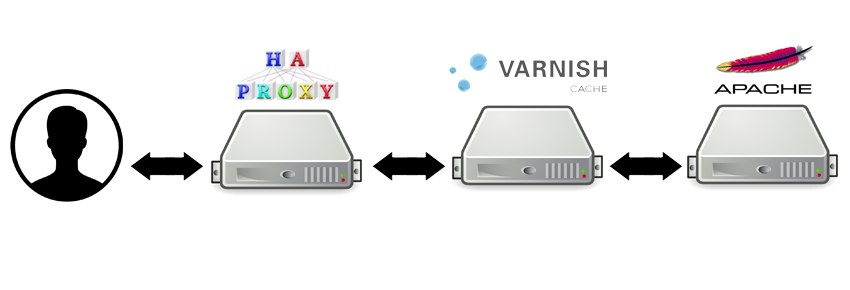
这次发现每秒能响应的请求已经达到 900 多了,翻了一倍,所以缓存为王,可谓实至名归。

Chopper.jpg